
AI takeoff software that turns plan sets intoCSI quantities in minutes
Upload a PDF or Revit model. Axiom reads every sheet, extracts scope with quantities and units, maps it to CSI MasterFormat, and hands you an estimate you can price — with on-screen measuring tools right there for anything you want to verify yourself.
No credit card to start. Every new account gets a sample plan set preloaded.
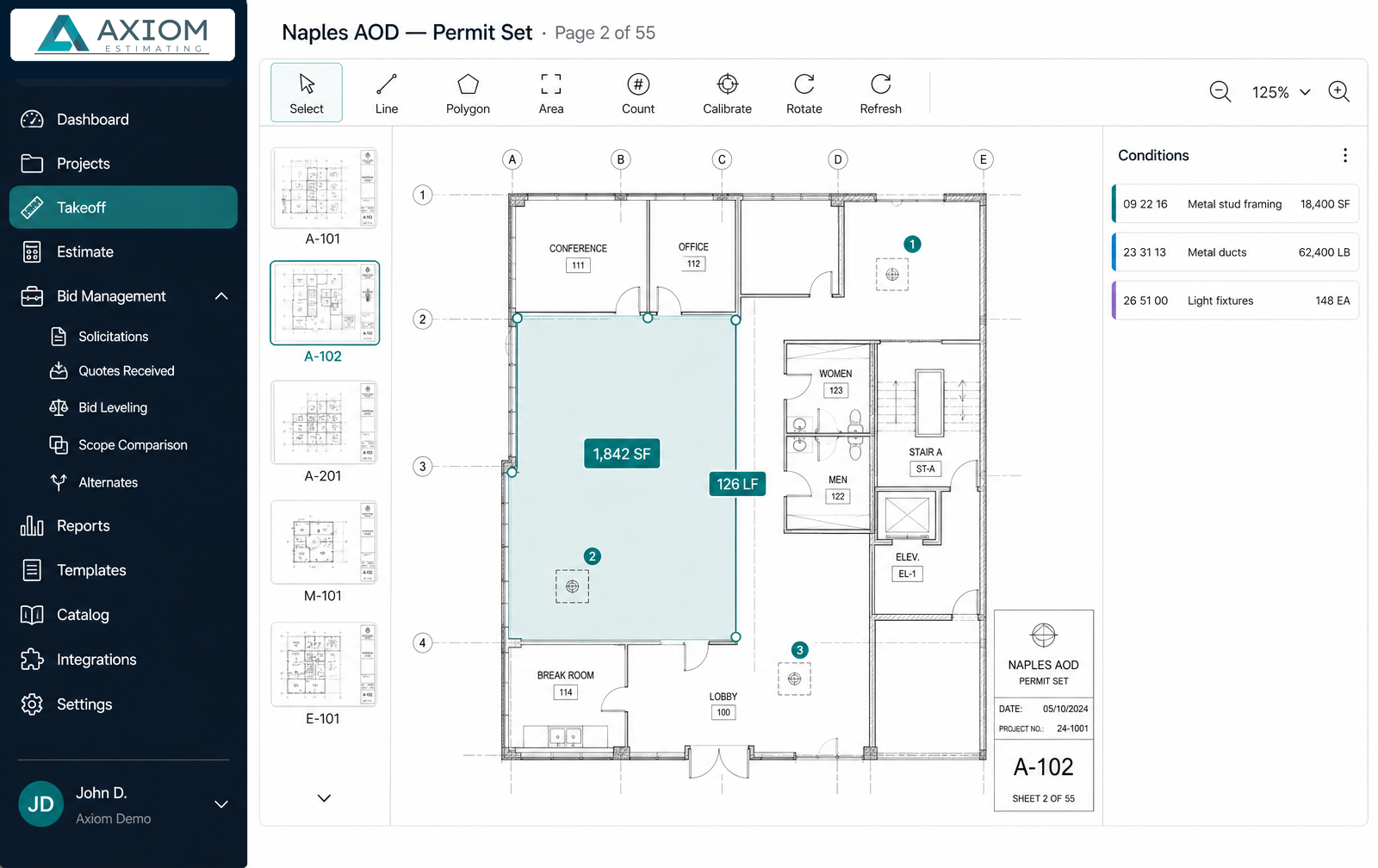
From plan set to priced estimate
Four steps, and you stay in control at every one of them.
Upload the plan set
Drop in a PDF or Revit model. Sheets are indexed, thumbnails render, and scale is calibrated per sheet.
AI reads every sheet
Each sheet is analyzed in sequence with live progress. Scope is extracted with quantities, units, and CSI codes.
Verify and measure
Adjust anything the AI got wrong and add manual counts, linear runs, and areas on the same canvas.
Push to the estimate
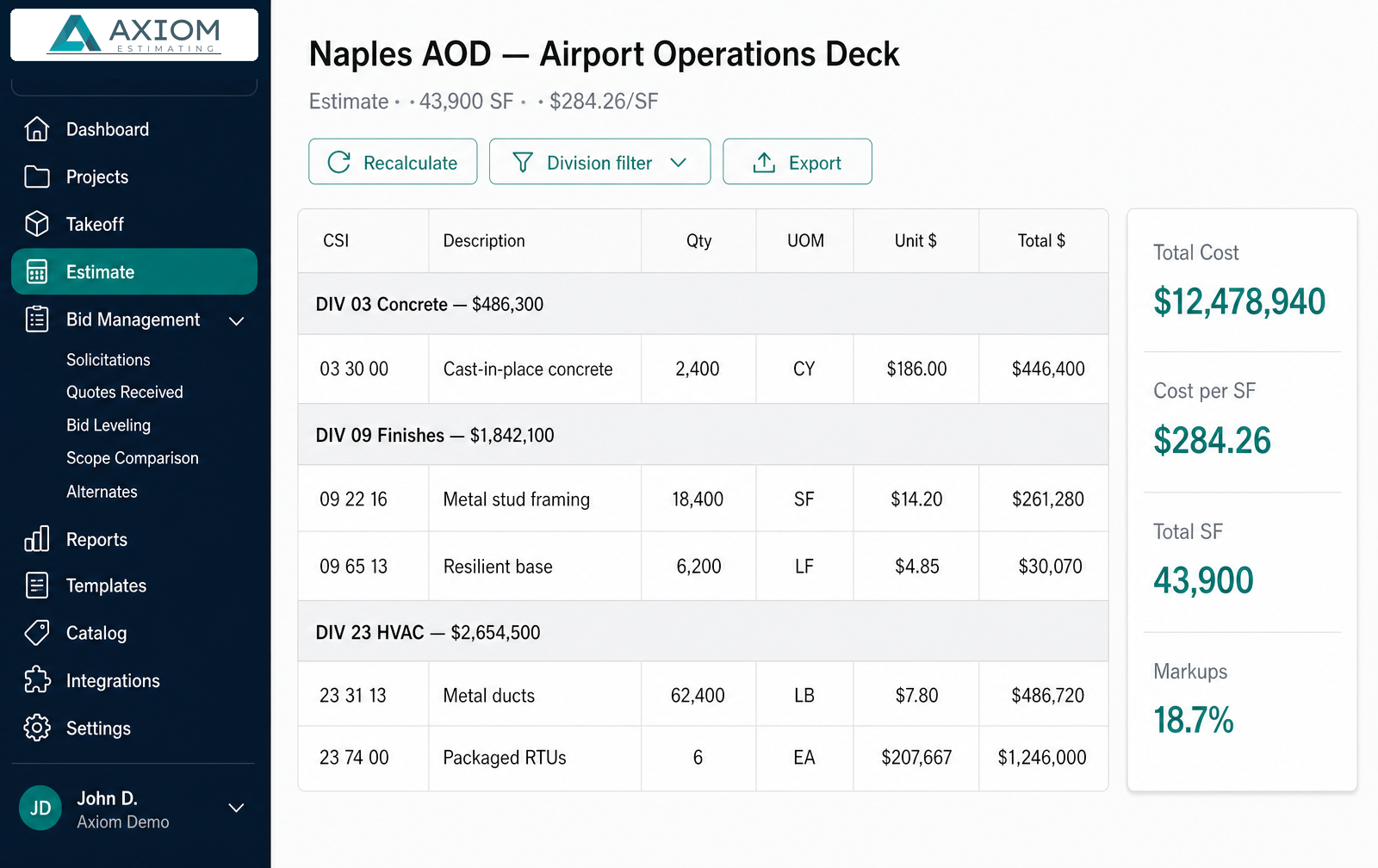
Review the CSI mapping, then push quantities into a priced estimate with assemblies and unit costs applied.
Why estimators trust the numbers
An AI takeoff is only useful if you'd put your name on the bid. Axiom is built around verification, not blind automation.
Sheet-by-sheet processing
Large plan sets never stall out. Each sheet saves as it finishes, so partial results are usable immediately.
CSI MasterFormat structure
Quantities land on 6-digit codes and roll up to divisions, so your estimate is bid-ready without re-sorting.
Unit-of-measure integrity
SF, LF, CY, EA, and TON are validated against the geometry. Mislabeled units get flagged and auto-corrected.
Built-in bid leveling
Compare sub quotes side by side against your own takeoff and surface scope gaps before you commit a number.
Revision comparison
When an addendum lands, see what was added, removed, or changed instead of re-doing the whole takeoff.
Estimator-in-the-loop
Nothing is auto-committed. You review the mapping, and your corrections train the model on your own drawings.
The takeoff doesn't stop at quantities
Push measured conditions straight into a CSI-structured estimate. Apply assemblies so framing, board, tape, and finish price together. Change one unit cost and cascade it across every affected line. Then export a branded proposal, a GC sheet, or a leveling matrix.
- Mapping review before anything hits the estimate
- Assembly library across Divisions 02–28
- Division cost-per-SF sanity checks that flag under-scoped trades
- Side-by-side bid leveling with scope-gap detection
AI takeoff questions, answered
How does AI takeoff work on a PDF plan set?
You upload the plan set, Axiom reads it sheet by sheet, and each sheet is analyzed for scope — walls, partitions, fixtures, ductwork, structural members, finishes. Detected work is written back as line items with a quantity, a unit of measure, and a CSI MasterFormat code you can review before anything reaches your estimate.
How accurate is AI construction takeoff?
Axiom treats the AI pass as a first draft, not a final number. Quantities are reconciled against deterministic math — steel tonnage from AISC weight-per-foot, wall area from length and height, perimeter from area geometry — and every division is checked against typical cost-per-square-foot bands so under-scoped trades are flagged instead of silently shipped.
Can I correct or add to what the AI found?
Yes. Every AI quantity is editable, and the manual on-screen takeoff tools sit on the same canvas — count, linear, and area measurements with per-sheet scale calibration, ortho lock, deduct mode, and sticky heights. Your corrections are captured as training examples that improve future extractions on your own drawings.
Does it handle large plan sets?
Yes. Sheets are processed asynchronously with live per-sheet progress, so a 50+ sheet set keeps working in the background while you review the sheets that are already done.
What file types are supported?
PDF plan sets for on-screen and AI takeoff, plus Revit models for 3D quantity extraction. Results export to PDF, Word, CSV, and TSV.
What happens after the takeoff?
Quantities push straight into a CSI-structured estimate with a mapping review step. From there you can apply assemblies, cascade unit-cost changes, level subcontractor bids side by side, and export a branded proposal or GC sheet.
Still comparing options? Read how Axiom compares to PlanSwift, Bluebeam, STACK, and OST, see the free vs. paid construction estimating software guide, or explore the full platform capabilities.
Run your next plan set through it
Create an account and a sample project is already waiting — real drawings, real takeoffs, real estimate lines — so you can see the workflow before you upload anything of your own.